Creating great Koah ads
Koah places your ad inside an AI conversation, matched to what someone is actually trying to do. That changes what good creative looks like.
- Use dynamic copy where your category allows it. It outperforms copy you write yourself.
- If you write your own line, name the specific thing and keep it under 160 characters.
- Use one clear subject per image, exported at 1.91:1.
- Choose “Get started” or “View more” over “Learn more”.
- Refresh your creative every four to six weeks.
Your ad appears in the middle of a conversation, alongside an answer someone asked for. There is no search box and no keyword to match. Koah reads the intent of the exchange and places the ad that fits it.
So the reader is already mid-task when they meet you. Creative that tells them exactly what you are and why it helps right now outperforms creative that tries to be memorable. The sentence on the card moves click-through more than any other choice you make. It beats the image, the format, and the button.
Overall guidance
- Be useful before you are clever. The reader is in the middle of something. Plainly saying what you sell and who it is for beats a memorable tagline. A clever line the reader has to decode is a line they scroll past.
- Build for coverage, not one perfect ad. The more distinct angles you give Koah, the more conversations it can find a fit in. Dynamic copy produces that range for you; if you write your own, three or more variants per image is a good floor.
- Make each angle genuinely different. A feature, a use case, a price and an occasion are four angles. Four rewordings of “the best X” is one.
- Match the creative to the destination. Link to the page the ad describes, not your homepage. The closer the two match, the better the whole path performs.
Two ways to write your copy
You can either write the copy yourself and have it served word for word (static copy), or supply a product description and let Koah write fresh copy for each conversation (dynamic copy).
Dynamic copy outperforms static copy, earning around 6% more clicks for the same creative in the same placement. If your category allows generated wording, start there. The rules below differ depending on which you use.
Dynamic copy, where Koah writes it for you
You supply one product description. Koah writes new copy for every conversation, drawing on what that description contains, and will render it in the reader's language where needed. The description is your only copy lever, so it is worth getting right.
- Keep the description under 250 characters. 150 to 250 is the sweet spot. Descriptions over 250 characters perform about 10% worse, and over 400 worse again. Long source text gives the generator too many directions to wander in.
- Put every specific you want to appear into the description. Product name, price, the proof point, what it actually does. Koah can only write with what you supply. A detail that is not in the description will never reach a reader.
- Write it as product truth, not as an ad. No slogan, no call to action, no rhetorical questions. Plain declarative sentences about what the thing is give the cleanest results.
- Only include claims that hold everywhere. Every version is written fresh, so a claim you cannot stand behind will be rephrased hundreds of different ways, some of them stronger than the original.
- One product per description. A description covering a whole range produces vague copy. Split it into separate ads and let targeting pick between them.
Static copy, where you write it yourself
- Say what it is, not how it feels. Name the product, the destination, the feature, or the price. Mood-led copy consistently loses to copy a reader can act on.
- Lead with the detail that would make someone choose you. Put it in the first clause, before any brand framing.
- Stay under 160 characters. Going past it costs roughly 17% of your clicks. Below it, length stops mattering, so spend the effort on what the copy says rather than on trimming it further.
- Let the copy and the image reinforce each other. If the picture shows a place, name that place. If it shows a product, name the product.
- Write upper-funnel copy. On search, people arrive already knowing what they want. On Koah they arrive mid-problem, before they have picked a product or a brand. Copy that introduces the brand and explains what the product does will perform better at this point in the user journey.
- Give every image at least three different variants. You are producing by hand the range that dynamic copy produces automatically. Three distinct angles per image is a reasonable floor.

Same image, same button, same audience. The copy that names the city earned 1.7× the clicks. Both are well written; only one tells the reader what they are looking at.
One subject, clearly shown
An image helps, but it is not where the leverage is. Swapping one good image for another good image moves click-through far less than changing the sentence beside it. Get the image to “clear and relevant”, then put your effort into copy.
- Show one thing. A single product, place, or person, filling the frame. Lineups, grids and collages consistently underperform the single hero shot.
- Separate the subject from the background. A plain ground or genuine depth of field. Busy backgrounds read as noise at ad size.
- Export at 1.91:1. Every card image is centre-cropped to this ratio. Supply it yourself and you keep control of the composition.
- Show the thing the copy is about. A generic stock image that could belong to any brand in your category is a wasted slot.
- Text on the image is your call. We measured it and found no effect either way. Use it if your brand system calls for it, but don't spend design time there that could go into the copy.
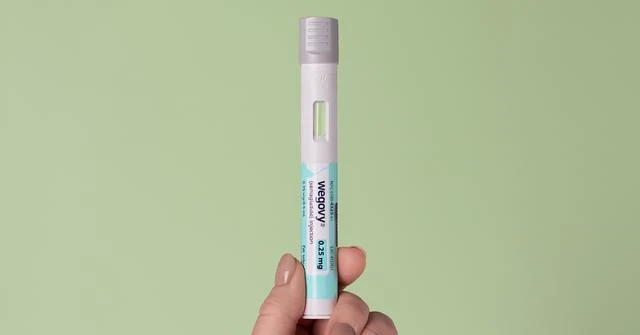
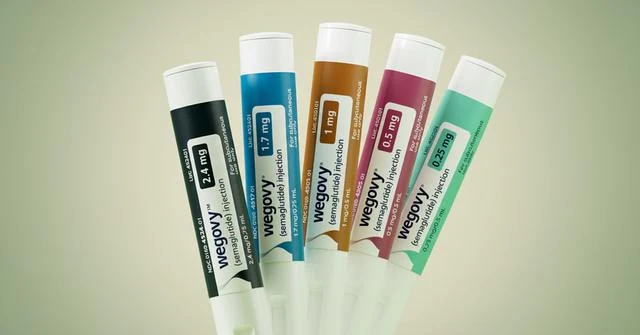
Identical copy on both. The single pen on a plain ground earned 1.1× the clicks of the full range.
- One subject, in focus, filling the frame
- Plain or softly blurred background
- 1.91:1 at 1200px wide or larger
- The specific product or place in your copy
- Imagery that could only be yours
- Whether to put text on the image (no measurable effect)
- JPEG versus PNG (no measurable effect)
- Uploading at 2400px instead of 1200px
- Photography versus illustration versus 3D
- Swapping one good image for another good one
Avoid “Learn more”
Only one button label is reliably worse than the rest, and it is the common default. Measured inside matched ad groups across 22 advertisers:
| Button | Versus “Learn more” | Use it when |
|---|---|---|
| View more | 1.10× the clicks | The destination is a browse page, a range, or a collection |
| Get started | 1.06× the clicks | The destination is a sign-up, a trial, or a first step |
| Learn more | Baseline | Avoid unless nothing else is honest about the destination |
“Get started” and “View more” perform the same as each other, so choose on accuracy, not performance.
Replace creative every four to six weeks
- Expect about 12% of the click rate to fade by week four. The first two weeks are the strongest. Weeks two and three barely move. The drop lands in weeks four to seven.
- After that it holds. There is no later cliff. An ad running for six months performs about the same as it did at week eight, so long-running creative is not quietly dying.
- Start with the copy. New lines are cheaper to produce than new photography, and copy is where the wider range sits.
Choosing a format
Card is the default and carries most Koah delivery. The interactive formats are not measured on click-through. Their job is the interaction itself, and judged that way they do well.
| Format | Best for | Measured on |
|---|---|---|
| Card (text or image) | Any objective. The widest reach and the highest click rate. | Click-through 1.4% |
| Catalog | Multiple products or SKUs in one unit. Outperforms card where it runs. | Click-through 1.28× card |
| Expandable | Offers that need explaining. A teaser that opens into the full story. | Expands 2.8% |
| Poll / CTA | Building interest and first-party signal rather than immediate clicks. | Votes 1.4% |
| Quick Pick | Letting the reader choose between options. | Picks 0.5% |
| Rabbit Hole | Answering the follow-up questions your category attracts. | New format |
| Budget Finder | Ranges where price is the main decision. | New format |
An image card and a text card perform within a few percent of each other. Adding an image to a text card is worth doing for brand presence, but it is not on its own a performance change.
Delivery requirements
Every image slot is centre-cropped to the ratio shown. Copy over the limit is truncated.
| Format | Copy | Image | Items | CTA |
|---|---|---|---|---|
| Card / Text | ≤ 500 chars | None | None | 1 button |
| Card / Image | ≤ 500 chars | 1 × 1.91:1 | None | 1 button |
| Poll / CTA | Question ≤ 500 | None | 3 options, ≤ 50 chars each | 1 button |
| Expandable | Teaser ≤ 500, expanded ≤ 2,500 | None | None | 1 button |
| Catalog | Title ≤ 120, desc ≤ 300, price ≤ 40 | 1:1 each | ≤ 12 | None |
| Rabbit Hole | Answer ≤ 1,500 | 2:1 | ≤ 6 Q&A, ≤ 4 products each | None |
| Quick Pick | Title ≤ 40, subtitle ≤ 80 | 2:1 each | ≤ 8 cards | ≤ 40 chars each |
| Budget Finder | Title ≤ 60, subtitle ≤ 40 | 5:4 each | ≤ 4 groups, ≤ 2 items each | None |
Figures current to October 2026 and refreshed as the mix of advertisers and apps changes. Creative examples are live ads served on Koah inventory.
Questions about your account or creative review? Talk to your Koah contact.